How to connect Claude to PubMed (step-by-step setup)
Set up the PubMed connector in Claude for verified medical literature search — enable it, query it, and check every PMID so citations are real, not hallucinated.
Jun 22, 2026
Laszlo Szabo 

Large language models like Claude are transforming how clinicians and researchers interact with the medical literature. But with great power comes a well-known hazard: hallucination, the confident generation of plausible-sounding but entirely fabricated citations, statistics, or clinical claims. For a transplant surgeon relying on accurate evidence to inform practice or prepare a manuscript, a hallucinated NEJM paper with a fictitious p-value is worse than useless. It is dangerous.
I learned this the hard way. Early in my experiments with AI-assisted literature work, the model confidently produced a “systematic review” on machine perfusion outcomes, complete with a DOI, author list, and sample size. It looked perfect. It did not exist. That experience shaped every habit in this guide.
This post is a practical guide to using Claude effectively and safely for medical literature search, covering prompt engineering principles, direct PubMed integration via the model’s connectors, and a set of habits that make the difference between a reliable research assistant and a confident confabulator.
Understanding the mechanism helps you design better safeguards.
LLMs like Claude were trained on large corpora of text, including abstracts, preprints, and biomedical articles. The model learned statistical patterns across this corpus, but it does not have a live database connection, nor does it have an indexed, verifiable list of every paper ever published. When asked to recall a specific citation, the model is performing pattern completion, not database retrieval. It “knows” that papers about tacrolimus nephrotoxicity exist and roughly what they look like, so it generates one: sometimes real, sometimes a convincing chimera of several real papers fused together.
The three most common failure modes are:
The good news: all three are largely preventable with the right workflow.
The single most important principle is this:
Never ask Claude to retrieve citations from memory. Use Claude to help you search, interpret, and synthesise, but let verified databases do the retrieving.
Instead of:
"What are the key papers on pancreas transplant outcomes in the UK?"Use:
"Help me construct a PubMed search string to find papers on pancreas
 transplant outcomes in the UK, published in the last 10 years, focusing
 on graft survival and patient-reported outcomes."
The first prompt invites Claude to reach into its weights and produce citations it cannot verify. The second uses Claude’s genuine strength, reasoning about search strategy, while keeping actual retrieval in PubMed where it belongs.
Before getting into prompting techniques, it is worth explaining a framework that underpins good literature searching: PICO.
PICO is a structure from evidence-based medicine that forces you to be precise about your clinical question before you start searching. It stands for:
Each element maps naturally onto search terms: your P and I give you the core MeSH terms and keywords, your C narrows the results, and your O helps you filter for relevance. It forces precision before you start searching, which prevents the common mistake of running broad, unfocused queries that return thousands of irrelevant results.
There is also an extended version, PICOS, which adds S – Study design (e.g. RCTs only, cohort studies, systematic reviews), useful when you want to filter by level of evidence from the outset. The Cochrane Handbook has an excellent primer on PICO for those wanting to go deeper.
PICO is the perfect input format for an LLM. A well-formed PICO question gives the model exactly what it needs to generate a high-quality, comprehensive Boolean search string, as you will see below.
Tell Claude exactly what role you want it to play. Good framing at the start of a session anchors behaviour throughout:
You are helping me plan a systematic literature search. Your job is to help me
build search strategies, suggest MeSH terms, and interpret results I paste to you.
Do NOT generate citations from memory. If I ask about a specific paper,
tell me to verify it in PubMed directly.Claude excels at translating a clinical question into structured Boolean logic. Frame queries in PICO format:
I want to search PubMed for the following PICO question:

P: Adult kidney transplant recipients on tacrolimus
I: Extended-release tacrolimus (Advagraf)
C: Immediate-release tacrolimus (Prograf)
O: Renal function at 12 months, graft survival, rejection episodes

Please generate a PubMed-compatible Boolean search string using MeSH terms
where appropriate, and suggest filters. Explain your term choices.
This produces something like:
("tacrolimus"[MeSH Terms] OR "tacrolimus"[tiab])
AND ("delayed-action preparations"[MeSH Terms] OR "extended release"[tiab]
     OR "Advagraf"[tiab])
AND ("kidney transplantation"[MeSH Terms])
AND ("graft survival"[MeSH Terms] OR "glomerular filtration rate"[tiab]
     OR "renal function"[tiab])
You paste this directly into PubMed. Claude built the strategy; PubMed does the retrieval.
When you have real search results, paste the abstracts in. This eliminates hallucination risk entirely for the material Claude is working with:
Here are abstracts of 5 papers I found on PubMed. Please summarise the key
findings on graft survival outcomes, note methodological differences, and
highlight contradictory findings between studies.

[PASTE ABSTRACTS HERE]
Treat Claude like a fast, well-read colleague you have handed a stack of papers.
Claude is capable of calibrated uncertainty, but you have to ask for it:
When summarising these papers, explicitly flag:
- Any claims where studies disagree
- Any statistics you are uncertain about
- Anything you are inferring rather than reading directly from the abstract

Use phrases like "based on this abstract alone..." or
"I cannot confirm this from the text provided..."For PRISMA-style work, ask for structured summaries you can feed into Rayyan or Covidence:
For each abstract I paste, produce a structured summary with:
- Study design
- Population (n, inclusion criteria)
- Intervention
- Primary outcome and result
- Risk of bias flags
- Relevance to my question (High / Medium / Low) with one-sentence justification

Return as a markdown table.To connect Claude to PubMed, open claude.ai or the Claude desktop app, go to Settings → Connectors, and enable PubMed. Once active, Claude queries the live PubMed API during a conversation and returns verified PMIDs, titles, and abstracts — citations that come from the database, not from the model’s memory, so they are real and checkable.
For the full setup, example prompts, and a verification routine, see the dedicated walkthrough: How to connect Claude to PubMed (step-by-step setup).
This is where the workflow becomes genuinely powerful. Claude on claude.ai supports native integrations through MCP (Model Context Protocol) connectors, giving Claude real-time tool access to external databases. The connectors relevant to medical literature search are:
When enabled, Claude can directly query PubMed and return verified results: real PMIDs, real abstracts, real author lists. This fundamentally closes the hallucination loop for citation retrieval.
To enable: Claude.ai -> Settings -> Connectors -> enable PubMed
With the connector active:
Search PubMed for randomised controlled trials on belatacept versus calcineurin
inhibitors in kidney transplant recipients, published since 2018. Return titles,
PMIDs, and a one-sentence summary of each.
Claude executes the search against the live PubMed API. Because citations come from the database, not from Claude’s weights, they are verifiable and real.
Best practice with the connector:
Scholar Gateway provides access to broader peer-reviewed literature beyond MEDLINE’s scope, useful for health economics, implementation science, or social determinants questions. Enable it alongside PubMed:
Search both PubMed (clinical trials and systematic reviews) and Scholar Gateway
(health policy and economic analyses) on the cost-effectiveness of SPK
transplantation versus kidney-alone transplantation.The bioRxiv / medRxiv connector gives the model access to preprints, a double-edged tool. You get the latest work before peer review, but findings may change substantially. Always flag preprint status:
Search medRxiv for recent preprints on machine learning models for deceased
donor kidney quality scoring. Mark each result clearly as
[PREPRINT - not peer reviewed] and note the submission date.Here is the five-step workflow I now use for every literature-heavy writing task. This example covers a grant background section on DCD versus DBD kidney transplantation outcomes, but the pattern works for any clinical question.
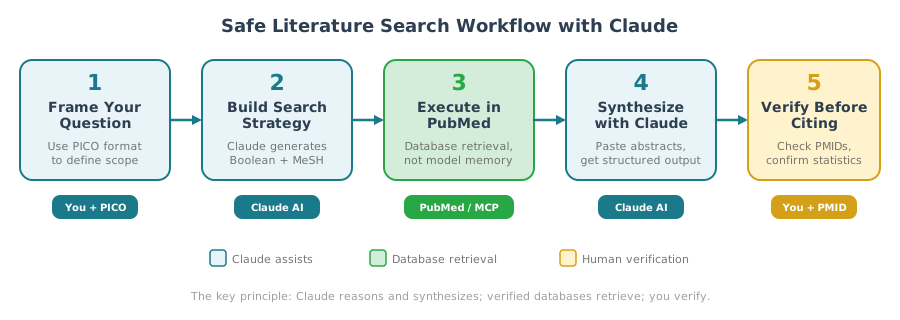
Step 1 – Frame the question
I am preparing a grant background section on DCD versus DBD kidney
transplantation. Key outcomes: delayed graft function, 1-year graft survival,
eGFR at 12 months. Time frame: 2015-2025. Study types: RCTs, cohorts n>100,
systematic reviews.
Step 2 – Generate the search strategy
Generate a PubMed Boolean search string. Include MeSH terms for DCD and DBD.
Suggest date and publication type filters.
Step 3 – Execute (via connector, or run in PubMed and paste results)
Step 4 – Structured synthesis
Here are 12 abstracts from my search. Please produce:
(1) A 3-4 paragraph narrative summary suitable for a grant background section
(2) A markdown table comparing key study findings
(3) Evidence gaps and contradictions
(4) Reference list - use only papers from the list I provided.
    Do not add citations from memory.
Step 5 – Verify before you cite. For every paper entering your final document: look up the PMID on PubMed, confirm author list and journal, check that the statistic Claude quoted matches the abstract. Thirty seconds per paper.
Watch for these warning signs:
Apply the simple test: “What PMID supports that?” If Claude cannot produce a verifiable one, treat the claim as unverified.
| Habit | Why It Matters |
|---|---|
| Use connectors for retrieval | Real database queries, not model memory |
| Paste abstracts, don’t prompt from memory | Grounds Claude in verified text |
| Always request PMIDs | Gives you a verification handle |
| Explicitly request uncertainty flags | Surfaces inference vs. evidence |
| Verify key statistics before citing | Final safeguard before publication |
These five habits work reliably for manual AI-assisted literature search. I have since codified them into a reusable Claude skill for clinical protocol review, which enforces dual-source searching, a reference ledger, and automated DOI verification every time it runs.
Can Claude replace PubMed for literature searching?
No. Claude is not a citation database. It cannot guarantee that any reference it generates from memory is real. Use Claude to build search strategies, interpret abstracts, and synthesize findings. Let PubMed and other verified databases handle the actual retrieval. The PubMed MCP connector bridges this gap by giving Claude live access to the database.
How do I enable the PubMed connector on Claude?
Go to claude.ai, open Settings, then Connectors, and toggle on PubMed. Once enabled, Claude can query PubMed directly during your conversation and return verified PMIDs, titles, and abstracts. You can also enable Scholar Gateway and bioRxiv/medRxiv connectors from the same settings page.
What is the best prompt format for medical literature search?
Frame your clinical question using the PICO format (Population, Intervention, Comparison, Outcome), then ask Claude to generate a PubMed Boolean search string with MeSH terms. This produces precise, comprehensive queries that you can paste directly into PubMed. Adding a study design filter (PICOS) narrows results to your preferred level of evidence.
How can I tell if Claude has hallucinated a citation?
Ask for the PMID. If Claude cannot provide one, or the PMID returns no results on PubMed, the citation is likely fabricated. Other red flags: unfamiliar journal names (check the NLM catalogue), precisely stated statistics not sourced from a pasted abstract, and confident clinical answers given without using a connector.
Is Claude useful for systematic reviews?
Yes, at specific stages. Claude can help build search strategies, screen abstracts for relevance, extract structured data from pasted papers, identify evidence gaps, and draft narrative summaries. It cannot replace the systematic review methodology itself. Use it alongside tools like Rayyan or Covidence for abstract screening, and always follow PRISMA guidelines.
No AI model is a replacement for PubMed, Cochrane, or your own critical appraisal skills. But Claude is an exceptionally capable research assistant that can compress hours of search strategy, abstract screening, and evidence synthesis into minutes, provided you structure the interaction to play to its strengths while guarding against its failure modes.
Used well, it changes how you work. Used naively, it will invent a landmark trial you will spend 20 minutes trying to find.
The MCP connectors, particularly the native PubMed integration, are what make the difference. They transform an LLM from a pattern-completion engine into a grounded, database-backed research tool. Enable them, use them, and combine them with the prompt discipline above.
Your publications and systematic reviews will thank you.
@online{szabo2026,
  author = {Szabo, Laszlo},
  title = {Claude for Medical Literature Search: {Avoid} Hallucinations},
  date = {2026-03-03},
  url = {https://lszabo.me/posts/ai-literature-search/},
  langid = {en}
}